
Library Cleaning
Let’s get this straight: public spectral libraries are incredible. As of writing, the public libraries in GNPS (the academic counterpart of Ometa) contain over 2 million spectra. Each of those spectra represent the real blood, sweat, and tears of countless scientists who were willing to dedicate their time to the often-thankless task of creating a public good. So hats off to every one of you!
The fact that thousands of people have contributed to public spectral libraries is a real testament to the scientific community. But, the fact that thousands of people have contributed to public spectral libraries is also a real problem. We were all first-year grad students once.*
So, while these public libraries contain immaculate spectra of rare natural products that took over a decade to purify, they also contain entries with compound names like this:
Our team detected a feature with assigned 228.1956 m/z value. It's part of our data from a BCAEC metabolomic's analysis using a TripleTOF 5600+ mass spectrometer. If you find a peak with similar m/z value and the assigned MS2 matches ours, please contact us as it is important to understand BCAEC metabolome's changes under simulated T2DM culture condition.
First off, if you are in this boat, the good news is that MASST was designed just for you! And I do hope you find your perfect spectral match. But while this entry isn’t technically inaccurate, that’s not the case for all library spectra. Some contain inaccurate masses, compound names, structures, or all of the above. But how many errors are there and how do we find them?
At over 2 million spectra and constantly growing, verifying public libraries is not something you’re going to do by hand. That’s why we developed a library cleaning pipeline that verifies the accuracy of public library spectra and outputs a cleaned and verified version.
But before we get into those details, we should address the fact that different spectral libraries are built for different purposes. Your classic spectral library is painstakingly collected from pure compounds, ideally under multiple experimental conditions. This process is accurate but very slow, especially for compounds that are difficult to purify. Thus, researchers have developed alternative high-throughput approaches to complement existing traditional libraries. This includes large-scale multiplex syntheses, computational approaches to predict MS2 fragmentation, or database-scale searching of public data to identify new library compounds.
The best library depends on the question you’re asking. For example, if you just want to identify well-established metabolites with high accuracy, you’ll want to use a traditional spectral library. If you are studying marine sponges and are just trying to identify more than 0.1% of the metabolites, then a library containing computationally-derived library spectra could be the right choice. You can also use traditional libraries alongside non-traditional ones to glean as much information as possible - just remember that the level of confidence in a library match will be different depending on how a library was created.
Given these tradeoffs, we designed our library cleaning pipeline to lean towards the traditional end of the spectrum. This means that we prioritized removing false positives (inaccurate or low-quality library spectra) at the expense of false negatives (accurate spectra without enough metadata to automatically verify). We also limited results to compounds that are already in PubChem, which allowed us to verify structure, mass, adduct, charge, and compound name. But let’s dive in to the steps of how we get there:
Step 1: Remove tentative matches
This step removes spectra with "tentative" or "suspect" in the compound name. Ambiguity may be fascinating, just not in your compound IDs.**
Step 2: Remove low-resolution spectra
Removes spectra collected on low-resolution instruments. These spectra aren’t useful for searching high-resolution data, and can even lead to inaccurate matches. If you are still using low-res instruments, never fear, we do keep all the spectra filtered at each step in this process. In this case, these filtered spectra could be used to create a library that more accurately reflects the capabilities of your setup.
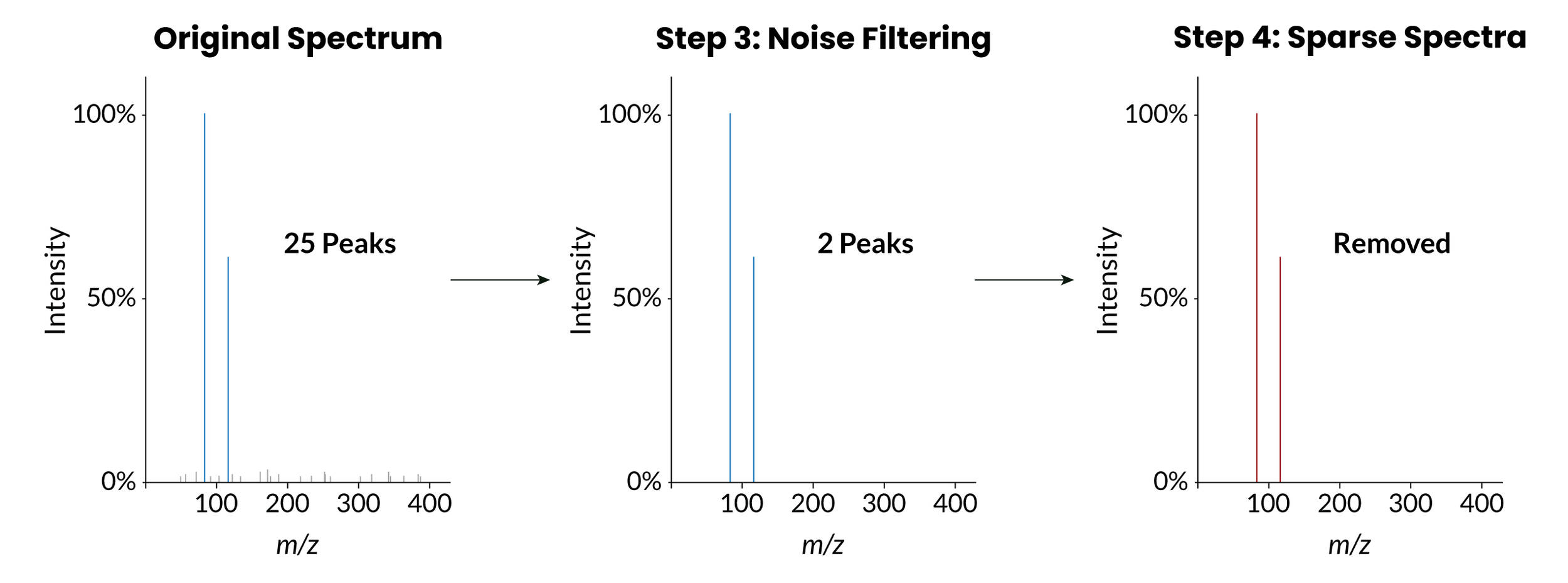
Step 3: Remove low-intensity peaks
Removes MS2 peaks that are below a certain percentage of the maximum peak intensity. You can set this percentage in the workflow input, the default value is 0.01%. In general, these low-intensity peaks are just instrument noise, which can lead to both false negatives (the noise peaks artificially lowered the matching score) and false positives (we matched all the noise peaks and none of the real peaks! Yay!). This step also leads directly to the next filtering step:
Step 4: Remove sparse spectra
Removes spectra with less than six MS2 peaks. Why six? Because by default, we only keep library matches with at least six matching peaks. So, no matter how pretty a spectra is, if it has less than six peaks, it will never result in a library match. Now, these are just defaults - it’s possible to change both the library matching settings and the library cleaning settings to keep spectra with fewer peaks. However, it’s worth being cautious with sparse spectra. Like most algorithms, library matching gets more accurate the more data points you have. MS2 peaks are those data points. So, the less peaks in your library spectrum, the less confidence in a library match.
Step 5: Validate structures
Removes spectra with invalid, inaccurate, or absent structural information. For this step, we require that a spectra has a SMILES, InChI, or InChIKey. For spectra that have at least one of these identifiers, the pipeline will derive the rest and ensure that they are consistent. If a spectra does not have any of these identifiers, or the SMILES, InChI, and InChIKey do not agree with one another, the spectra is removed.
Step 6: Validate mass
Ensures that the parent mass, adduct, ion mode, and precursor m/z of a compound match, and that they all agree with the structural information from the previous step. If information like adduct or ion mode are missing, the pipeline will attempt to find an appropriate value, but if it can’t, it will remove the spectrum. While we do technically keep them in a separate file, I really wouldn’t recommend using spectra filtered out at this step!
Step 7: Validate charge
Uses the adduct determined in the previous step to set the correct charge of the ion.
Step 8: Validate compound names
If you’ve used public libraries, you’ll know that compound naming is chaos. Is it “Rutin” or “Spectral Match to Rutin” or “A3847!-Rutin”? This step standardizes compound naming by pulling the IUPAC name from PubChem based on the compound’s InChIKey. This ensures that all reference spectra for the same compound have the same compound name. Of course, IUPAC names aren’t perfect (what do you mean acetyl-CoA is actually S-[2-[3-[[(2R)-4-[[[(2R,3S,4R,5R)-5-(6-aminopurin-9-yl)-4-hydroxy-3-phosphonooxyoxolan-2-yl]methoxy-hydroxyphosphoryl]oxy-hydroxyphosphoryl]oxy-2-hydroxy-3,3-dimethylbutanoyl]amino]propanoylamino]ethyl] ethanethioate?!?). So, the workflow also pulls common synonyms from PubChem to provide additional context.
Interestingly, this step also removes a lot of library spectra which aren’t yet in PubChem. Many of these spectra come from high-throughput synthetic libraries, which tend to contain a lot of novel compounds. This is one of the many reasons why it’s important to treat library curation as a continuous process instead of a one-time effort - compounds that are too novel for PubChem this week will likely be well-established metabolites in the future.
That’s it for our library cleaning steps. So how many public library spectra survived this gauntlet of verification? For that, you’ll have to check out our application note.
Want to learn more?
Check out this nice review on the importance of community-curated spectral libraries
A cool example of high-throughput library creation
Want to create high-throughput libraries of your own? Check out the msms-chooser workflow, which is available in Ometa Flow
Many of the verification steps in this pipeline were built on functions created by matchms. If you’re an academic, these functions have also been used to create a library cleaning pipeline available to academic and non-profit researchers through GNPS2, which you can read about here
Interested in using our cleaned libraries? Contact us.
*Or maybe you are one now. Congrats, you can do this! But also know that in 5 years you will likely look back and be slightly appalled.
**I say this as a co-author of a large suspect library, which is a great resource as long as you understand its limitations.
This research was supported by the National Institute of General Medical Sciences of the National Institutes of Health under award number 1R44GM162107. The content is solely the responsibility of the authors and does not necessarily represent the official views of the National Institutes of Health.